Drivers Daily Log Example: A Complete Fillable Sample
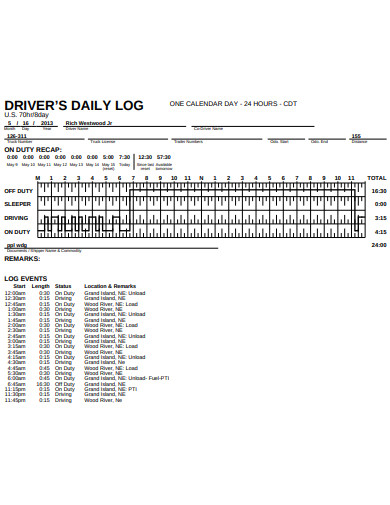
If you need a drivers daily log example you can copy, the sample below shows exactly how a 24-hour record looks when it is filled out correctly. A driver daily log (often called a duty status log or RODDS record) is the document that proves how a commercial driver spent every minute of a shift. Carriers keep these logs to show compliance with the Federal Motor Carrier Safety Administration's hours-of-service rules, and inspectors request them at roadside checks.
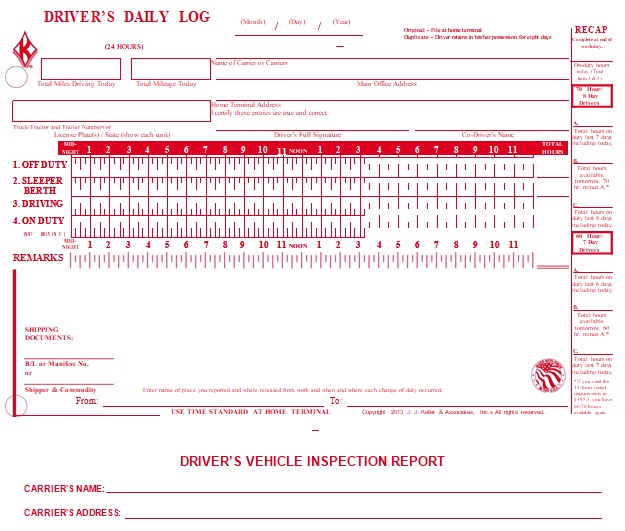
The example that follows is based on a real short-haul day, not a textbook scenario, so the totals add up and the notes are plausible. Use it as a template for your own entries, whether you still paper-log or run an ELD.
Why the daily log matters
Property-carrying drivers may drive up to 11 hours inside a 14-hour on-duty window, after which they must spend 10 consecutive hours off-duty. Passenger-carrying drivers follow a similar but slightly tighter rule set. The log is the evidence that those limits were respected. When an examiner asks for your last eight days of duty status, the log is what you hand over.
Three reasons the log gets close attention:
- Safety: Fatigue is a leading factor in large-truck crashes. The log enforces rest.
- Liability: After a crash, the log is one of the first documents a plaintiff's attorney subpoenas.
- Compliance scores: Hours-of-service violations show up on CSA (Compliance, Safety, Accountability) inspections and raise a carrier's BASIC scores.
Drivers daily log example, line by line
The header captures who, what, and where. The grid captures when. Together they cover what an inspector needs.
Header (page one, top section)
- Date: Tuesday, March 18 (day the 24-hour period began).
- Driver name: J. Reyes
- Co-driver: None
- Vehicle numbers: Tractor 4421 / Trailer 7710
- Carrier: Northbridge Freight Co., USDOT 3120449
- Shipping document number(s): BOL NB-2025-0318-04
- Total miles driven today: 287
- Total hours in each duty status: filled in below the grid.
- Remarks and shipping document totals: filled in below the totals.
Grid entries (the four duty statuses)
The grid has four rows: Off Duty (OD), Sleeper Berth (SB), Driving (D), and On Duty Not Driving (ON). Each line lists the status, the start time, and any change. Below is a realistic short-haul day. Times are in 24-hour format.
- 06:00 - Off Duty — Home, ended 10-hour reset at 06:00.
- 06:30 - On Duty Not Driving — Pre-trip inspection, fueling, paperwork at yard.
- 08:15 - Driving — Left yard, headed to pickup.
- 09:45 - On Duty Not Driving — Arrived at shipper, waited 30 min for dock.
- 10:15 - Driving — Left shipper toward delivery.
- 12:30 - Driving — Continued; brief 15-minute break noted on same line at 12:15-12:30.
- 13:00 - Off Duty — Parked at rest area, 30-minute meal break.
- 13:30 - Driving — Resumed route.
- 15:15 - On Duty Not Driving — Arrived at receiver, paperwork, drop-and-hook.
- 16:00 - Driving — Return leg, empty miles.
- 18:30 - Off Duty — Arrived home, end of duty day.
That is 11 lines of grid entries. It matches a typical 12.5-hour day with one load cycle.
Totals (filled in at the bottom of the grid)
- Off Duty: 9 hours 0 minutes (06:00-06:30 not counted; final block 18:30-24:00 plus 00:00-06:00 next day equivalent = 9.0).
- Sleeper Berth: 0 hours 0 minutes.
- Driving: 7 hours 30 minutes (08:15-09:45, 10:15-12:30, 13:30-15:15, 16:00-18:30).
- On Duty Not Driving: 1 hour 45 minutes (06:30-08:15, 09:45-10:15, 15:15-16:00).
Total of all four statuses equals 18.25 hours, plus the remaining 5.75 hours from 18:30 to 24:00 fall under the Off Duty block that continues into the next day's 24-hour period. Each day's sheet still totals 24 hours when the previous day's final Off Duty block is included on the new sheet.
Remarks section (bottom of page)

The remarks are where a driver tells the story behind the grid. Keep them short and factual.
- 06:30 — Pre-trip complete; no defects. Fueled 60 gal.
- 09:45 — Dock delay at shipper; appointment was 09:00.
- 12:15 — 15-min rest break taken at MP 142.
- 13:00 — 30-min meal break at rest area, MP 178.
- 15:15 — Delivery signed by R. Alvarez, dock 4.
- Shipping document totals: BOL NB-2025-0318-04, 1 shipment, 18 pallets, 24,500 lb.
How this example stays compliant
The day above respects every rule that applies to a property-carrying driver:
- 11-hour driving limit: 7.5 hours driven. Comfortable margin.
- 14-hour on-duty window: Window opened at 06:30 and closed at 18:30, which is 12 hours. Under the cap.
- 30-minute break: Taken at 13:00, before 8 hours of driving had elapsed since the last OFF/SB block.
- 10-hour reset: 18:30 to 06:00 the next day, exactly 11.5 hours off, satisfies the reset.
- 60/7 and 70/8 limits: Driver is on a 70-hour/8-day cycle and stayed well under the average.
Common mistakes to avoid in your own log
The example above looks clean because every entry is plotted. Most violations start with sloppy entries:
- Forgetting pre-trip and post-trip time. Pre-trip is ON, not OD. Skipping it costs you on-duty minutes and can blow the 14-hour window.
- Logging the dock wait as Off Duty. If you are waiting at a shipper and not relieved, it is ON, even if you are napping in the sleeper.
- Rolling the hours forward. Each line must start exactly when the previous line ended. Gaps trigger roadside questions.
- Mismatching remarks and grid. If you write "break 12:15" in remarks, the grid has to show a status change at 12:15.
- Unsigned logs. The paper sheet is invalid without your signature at the end of the day.
Paper log versus ELD: what changes
The grid on a paper log has 24 hour blocks. An ELD records the same data automatically and displays a similar graphic on the screen, but the entries are time-stamped by GPS and cannot be edited past a short window without annotation. Drivers who paper-log usually run short-haul, drive a vehicle older than model year 2000, or qualify for one of the small ELD exemptions.
Either way, the structure of the record is identical:
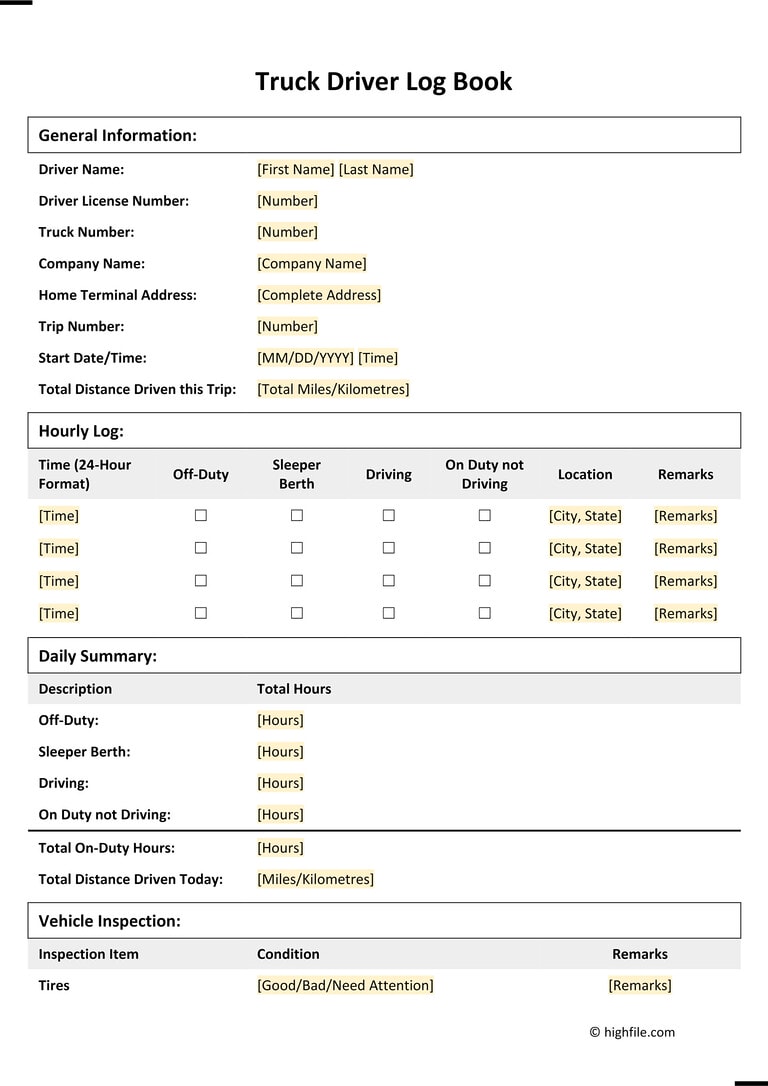
- Header identifying driver, carrier, vehicle, date.
- Grid showing all four duty statuses with time transitions.
- Totals at the bottom.
- Remarks that explain anomalies.
- Driver certification (signature on paper, button press on ELD).
How to use this sample as a template
- Open a blank RODDS sheet (the FMCSA-approved graph grid is one page per 24 hours).
- Fill in the header first. Date and carrier info go at the top before any grid lines are drawn.
- Plot your day start to finish. Step through your actual day in 15-minute increments and draw a continuous line.
- Total each duty row. The four totals must add to 24 hours.
- Add remarks for any line longer than 30 minutes that is not obvious from the grid.
- Sign and date at the bottom, then submit to dispatch per carrier policy.
If you run an ELD, the device handles steps 3 and 4. Your job is steps 2, 5, and 6, plus certifying the day in the app.
Quick reference: drivers daily log example totals
- Total miles: 287
- Driving: 7 h 30 min
- On Duty Not Driving: 1 h 45 min
- Off Duty: 14 h 45 min (including pre-midnight rest)
- Sleeper Berth: 0 h 0 min
- Total of all statuses: 24 h 0 min
Keep this drivers daily log example on your phone or taped inside the bunk. When a new driver asks what a clean log looks like, hand it over. It is easier to copy a real example than to read the rule book twice.
![61 Printable Driver's Daily Log Books [Templates & Examples]](https://templatelab.com/wp-content/uploads/2019/02/drivers-daily-log-01-790x1024.jpg)
![50 Printable Driver's Daily Log Books [Templates & Examples]](https://templatelab.com/wp-content/uploads/2019/02/drivers-daily-log-10.jpg)