What Is Form 2553 and How to File It
If your small business is structured as an LLC or a C-corporation, you may have heard that electing S-corporation tax status can lower your self-employment tax bill. The document that makes that happen is the 2553 form, officially titled Election by a Small Business Corporation. Filed with the Internal Revenue Service, this short but exacting form converts how your entity is taxed without changing its legal structure.
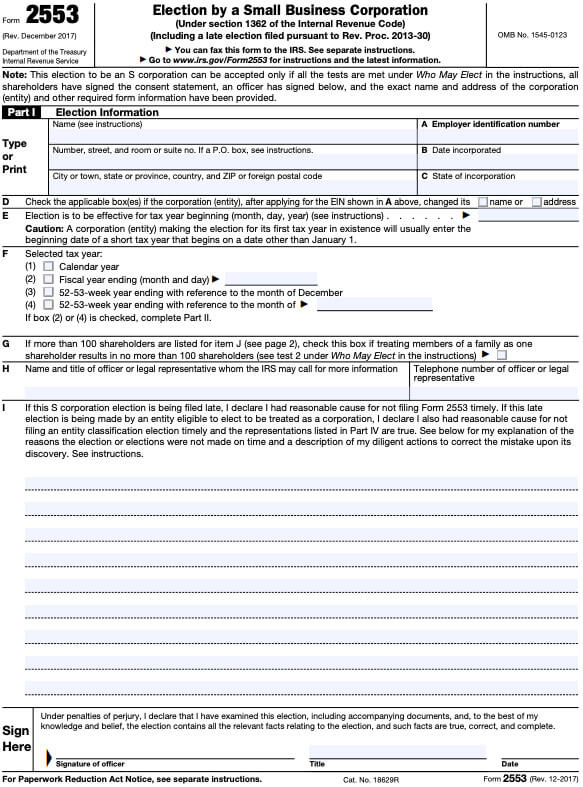
This guide explains what the form does, who can file it, the deadlines that catch most first-time filers, and the steps to submit it without errors.
What Form 2553 Actually Does
Form 2553 is an election, not an application. You are not asking the IRS for permission to become an S-corp; you are telling the IRS that your company meets the legal requirements and is choosing pass-through taxation under Subchapter S of the Internal Revenue Code.
Once the election is accepted:
- The corporation generally pays no federal income tax at the entity level.
- Profits and losses flow through to shareholders on Schedule K-1.
- Shareholders report the income on their personal Form 1040.
- The company files an informational return on Form 1120-S instead of Form 1120.
For many owner-operated businesses, this avoids the “double taxation” problem of a standard C-corp while allowing distributions to be split between a reasonable salary and a profit share, which can reduce self-employment tax exposure.
Who Is Eligible to File
The IRS limits S-corp status to a narrow set of companies. Before you sign the form, confirm every box on this list:
- The entity is a domestic LLC that has elected to be taxed as a corporation, or a domestic C-corporation.
- There are no more than 100 shareholders (husband and wife count as one for this purpose).
- All shareholders are U.S. citizens or U.S. resident aliens.
- The company has only one class of stock (differences in voting rights are fine; differences in economic rights are not).
- No shareholder is a partnership, corporation, non-resident alien, or most types of trust.
Entities that cannot file include non-profits, financial institutions that are S-corp-ineligible under Section 1361(b)(2), and companies with ineligible shareholders such as other LLCs.
When to File the 2553 Form
Timing is the single biggest reason these elections get rejected. The IRS gives you three filing windows:
- By the 15th day of the third month of the tax year the election is meant to take effect. For a calendar-year company that wants S-corp status for the current year, the deadline is March 15.
- Anytime during the tax year before the one you want it to apply to, making the election effective for the following year.
- Late, with relief, if you missed both windows. You can file the form any time and write “Filed pursuant to Rev. Proc. 2013-30” at the top to request automatic late-election relief, provided all shareholders sign and you meet the other conditions in that revenue procedure.
If the deadline has passed, do not assume the election is lost. The Rev. Proc. 2013-30 path is widely used and is often the simplest fix.
Information You Will Need to Complete the Form
The 2553 form asks for more than just names and dates. Gather these items before you start typing:
- Legal name, address, and Employer Identification Number (EIN) of the corporation.
- Date and state of incorporation, plus the state where the principal office is located.
- Effective date of the election.
- Name, address, and TIN of every shareholder, plus the number of shares owned and the date acquired.
- The tax year ending month (most companies use December).
- Each shareholder's tax year (calendar or fiscal), and the fiscal year end if applicable.
- Signature of an authorized officer such as a president or treasurer.
- Consent of every shareholder, signed either on the form itself or on a separate statement.
For community property states, the spouse of a shareholder may also need to sign. If you skip a required signature, the IRS will send the form back unprocessed, which can blow past your deadline.
Step-by-Step: How to File Form 2553
Step 1: Confirm eligibility one more time
Recheck the shareholder count, citizenship, and single-class-of-stock rules. An election that violates any of them is invalid from the start, and fixing it later costs time and money.
Step 2: Decide the effective date
Most new businesses elect S-corp status effective the same day the company begins business, the date of incorporation, or January 1 of the next tax year. If you are mid-year, weigh whether retroactive treatment is worth the extra administrative work.
Step 3: Collect signatures
Every person or entity who is a shareholder on the day the election is made must sign. If a shareholder sells stock between the effective date and the signing date, attach a statement of consent from the new owner as well.
Step 4: Complete the form
The current revision is available on IRS.gov. Use black ink if filing on paper. Many preparers now use IRS-approved e-file providers, which confirm completeness before submission.

Step 5: File with the right service center
Paper filings go to the Department of the Treasury, Internal Revenue Service Center, Kansas City, MO 64999. E-filed submissions are routed automatically. Mail the form by certified mail with return receipt if you need proof of the filing date.
Step 6: Wait for the CP261 notice
If the IRS accepts the election, you will receive a Notice CP261 confirming the S-corp status and the effective date. File it with your tax records. If the IRS has questions, you will receive a request for correction instead; respond quickly to keep the election on track.
Common Mistakes That Cause Rejection
- Missing shareholder consents. Even one unsigned consent can void the whole filing.
- Wrong EIN or TIN. A transposed digit on a single TIN will bounce the form back.
- Missed March 15 deadline with no Rev. Proc. 2013-30 notation.
- Pro-rata stock rights or unequal distributions that the IRS interprets as a second class of stock.
- Late filings tied to a dissolved entity; the IRS will not honor an election from a company that no longer exists.
- Late election relief requested without all required attachments, such as a statement explaining the missing signatures and a declaration that the company has filed all required returns consistent with the election.
What to Do After the Election Is Approved
Acceptance triggers several housekeeping tasks:
- Update payroll to withhold FICA on a reasonable salary for any owner-employee; S-corp shareholders who perform services must be paid W-2 wages.
- Switch the annual filing from Form 1120 to Form 1120-S and prepare to issue Schedules K-1 to each shareholder.
- Review the corporate minute book; add a resolution documenting the S-corp election and store the CP261 with the corporate records.
- Notify the state tax agency, since state-level conformity to federal S-corp treatment varies.
- Reassess the buy-sell agreement, shareholder agreement, and any convertible debt to make sure nothing creates a second class of stock.
When Form 2553 Is the Wrong Move
The election is not always the right answer. S-corp status can be a poor fit if you plan to raise venture capital, bring on a corporate investor, or grow beyond 100 shareholders. It is also unhelpful for solo businesses that have minimal profit, since the salary requirement can offset much of the self-employment tax savings. Run the numbers with a CPA before signing; the cost of an hour of advice is far less than the cost of unwinding a bad election.
Frequently Asked Questions
How long does it take the IRS to process Form 2553?
Paper filings typically take 60 to 90 days; e-filed submissions are often confirmed within a few weeks. You can check the status online using the IRS Where's My Amended Return tool after a few weeks have passed.
Can a single-member LLC file Form 2553?
Yes, but the LLC must first elect to be taxed as a corporation by filing Form 8832, then file Form 2553 to make the S-corp election. Many tax professionals handle both filings together to streamline the process.
Does the election ever need to be renewed?
No. A valid S-corp election stays in effect until the entity revokes it by filing a statement, loses eligibility, or terminates the election by ceasing to be a small business corporation.
What is the filing fee?
The IRS does not charge a fee for Form 2553 itself, but if you use a tax professional or e-file provider you will pay a service charge that typically ranges from $50 to $200.
Can the election be backdated?
Only through the Rev. Proc. 2013-30 late-election relief, and only if the entity has filed all required returns consistent with S-corp treatment for the years in question. Backdating is otherwise not allowed.
Bottom Line
The 2553 form is the bridge between a standard LLC or C-corp and the S-corp tax treatment that many small businesses rely on. The form is short, but the rules around eligibility, signatures, and deadlines are strict. Prepare your paperwork, confirm the deadline, collect every shareholder consent, and consider running the decision past a CPA if any part of the company's ownership structure is unusual. A clean filing means a clean CP261 in your records and a smooth transition to pass-through taxation for the years ahead.